One run, every channel
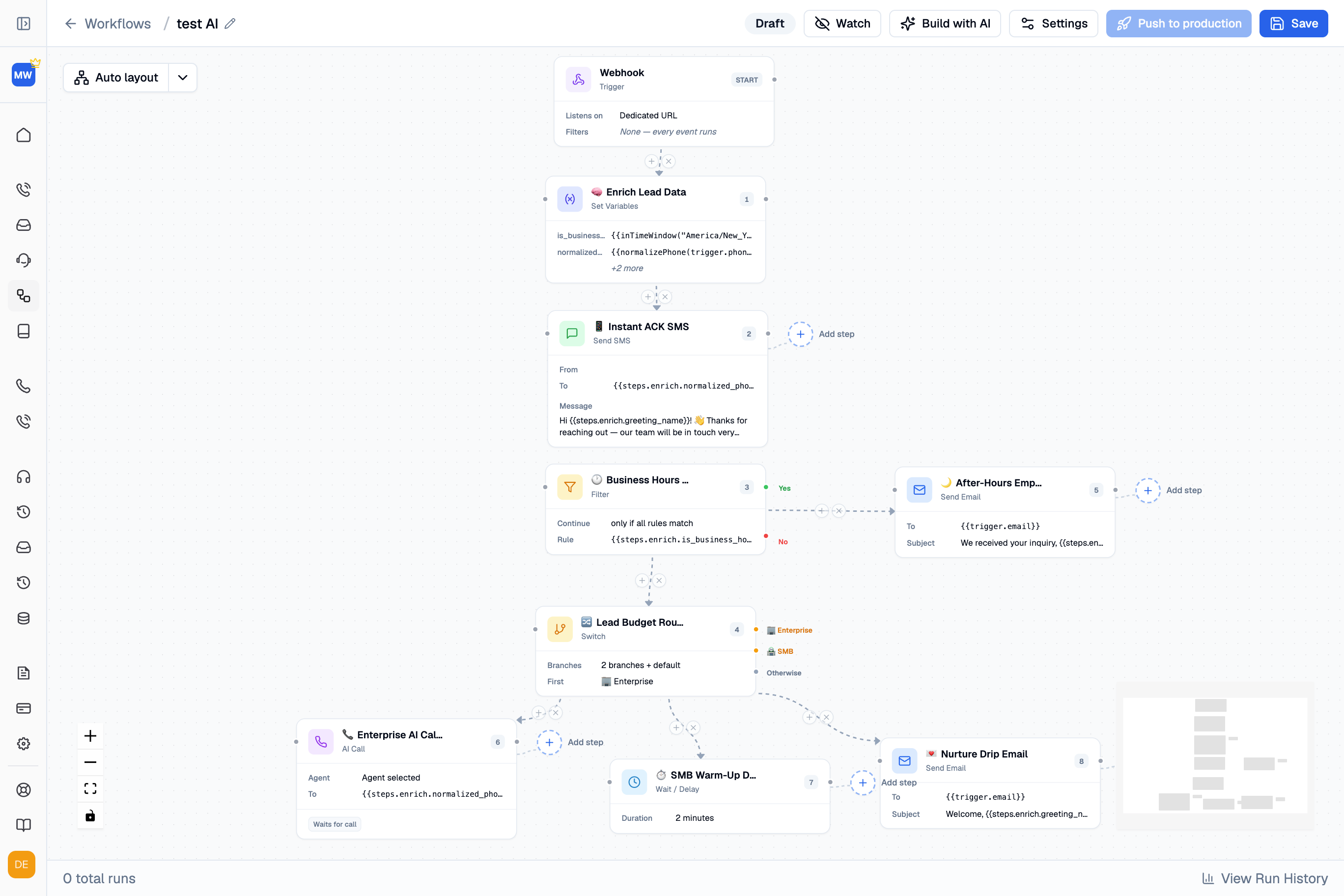
Calls, texts and emails share the same trigger data and variables, from the first step to the last.






Connect AI calls, SMS and email on a visual canvas. Set the routing, timing and system actions for every step.
Calls, texts and emails share the same trigger data and variables, from the first step to the last.
Route each run by business hours, lead budget or the criteria your team defines.
Describe the workflow, then refine its steps on the canvas. Or build it yourself.
Coordinate delays, warm-up waits and business-hours windows in the same run.
Work in draft, watch runs live and review their history before publishing changes.
How workflows work
A form fill, new lead or system event triggers a run with the data it needs.
Set variables, apply filters and route the run through your business rules.
Sequence AI calls, SMS and email, with context carried into every step.
Watch runs as they execute and trace their steps in the complete run history.
Workflow capabilities
Respond, route and follow through without disconnected automations.
Acknowledge form fills by SMS, then place a speed-to-lead AI call.
Use business-hours and after-hours branches for each response.
Gate runs with filters and switch between enterprise, SMB or your own segments.
Coordinate email and SMS nurture, database reactivation, delays and warm-up waits.
Send appointment reminders, payment and collections follow-ups from the same workflow.
Escalate the conversation with its full context, so your team can pick up where the workflow leaves off.
Triggers & systems
Start a run from a webhook, carry its data through every step and write outcomes back to your live systems.

CRM & scheduling integrations
Actions written into
HIPAA, GDPR and ACMA compliant, with TCPA and DNC support on outbound calling steps.
Role-based access controls who can work in each workspace.
Full audit logs and step-by-step run history keep actions available for review.
Test changes in draft. Publish them when your team is ready.
A trigger — every workflow begins with a webhook that any of your systems can call: a website form fill, a new lead in your CRM, or any other event. The run starts with that event’s real data, available to every step as variables, and filters decide whether and where the run continues.
AI calls, SMS and email run as sequenced steps on the same canvas, alongside timed delays, filters and switch branches. Because they belong to one run, every step shares the same trigger data and context — the AI call on the enterprise branch knows exactly what the acknowledgment text said.
Runs are triggered by webhooks from your systems, and outcomes are written back through the same integrations as every Trillet channel — GoHighLevel, Zoho CRM, Salesforce, Google Calendar, Cal.com and Stripe among them. Additional systems are connected through your system’s API during onboarding.
Workflows are built and edited in draft, so nothing changes in production while you work. You can watch runs live as they execute, review the complete step-by-step run history, and push to production only when the build is right.
Review your triggers, system integrations and production requirements with our team.